

Chapter 05 of 12
LANDING ZONE
Two worked examples
Both examples are based on designs built for organisations with a similar starting point, with the names and numbers removed. Use them to see how the pieces above fit together, not as templates to copy.
Example A: five accounts with one network hub
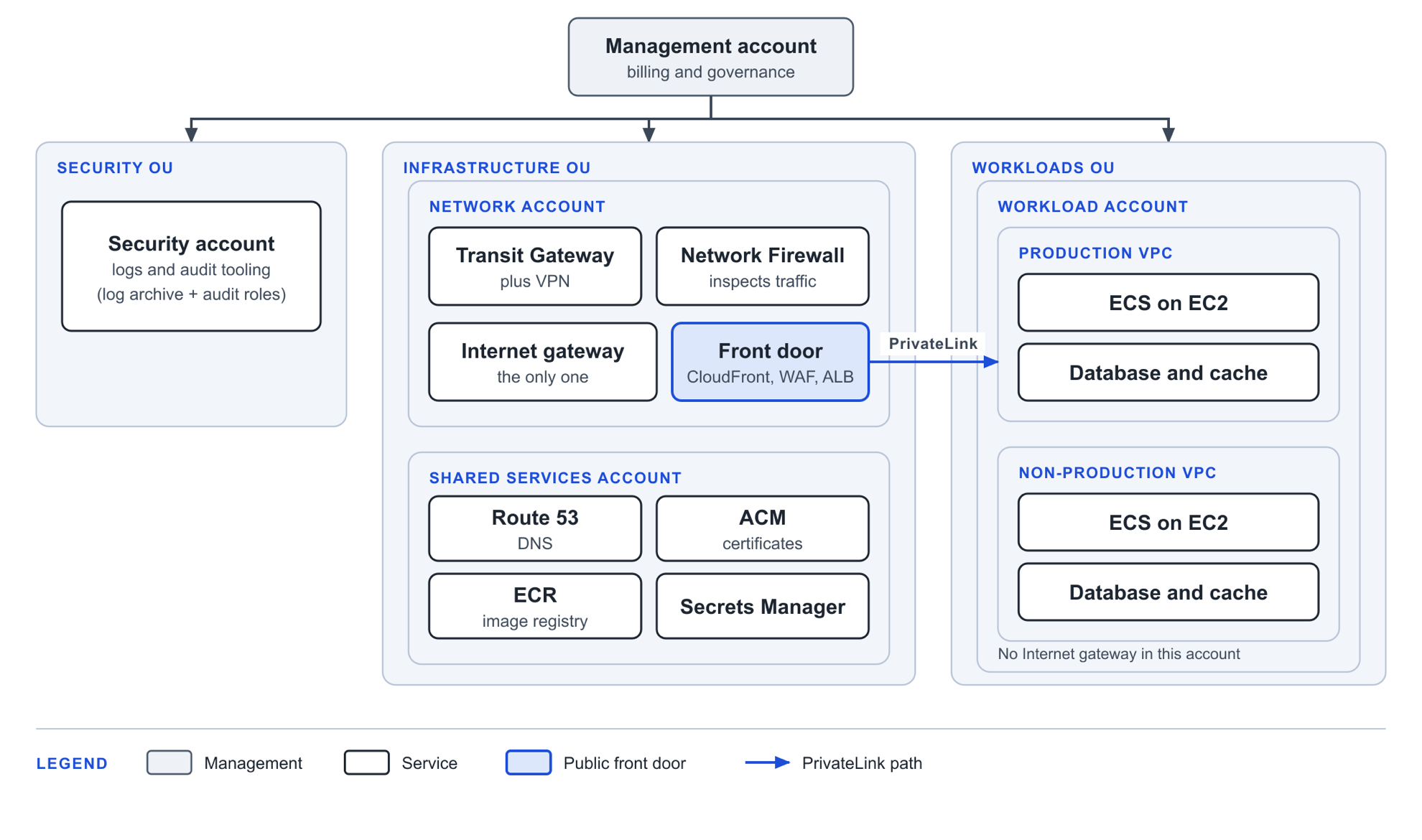
| Account | OU | What lives there |
|---|---|---|
| Management | Organization root | Billing and governance only. No workloads |
| Security | Security OU | One account for the organization's logs and audit tooling (the log archive and audit roles in a single account) |
| Network | Infrastructure OU | Transit Gateway, VPN, Network Firewall, the only Internet Gateway, and the public front door (CloudFront, WAF, public ALB) |
| Shared services | Infrastructure OU | Route 53, certificates (ACM), image registry (ECR), Secrets Manager |
| Workload | Workloads OU | ECS on EC2, database and cache. Two VPCs, production and non-production. No Internet Gateway |
The network ranges are small for the shared VPCs (a /22 each) and larger for each workload VPC (a /19 each).
Why the OUs: an SCP attached to an OU applies to every account added to that OU later, so a new workload account is covered from its first day and nothing needs to be attached by hand. The management account stays at the root.
How one request travels:
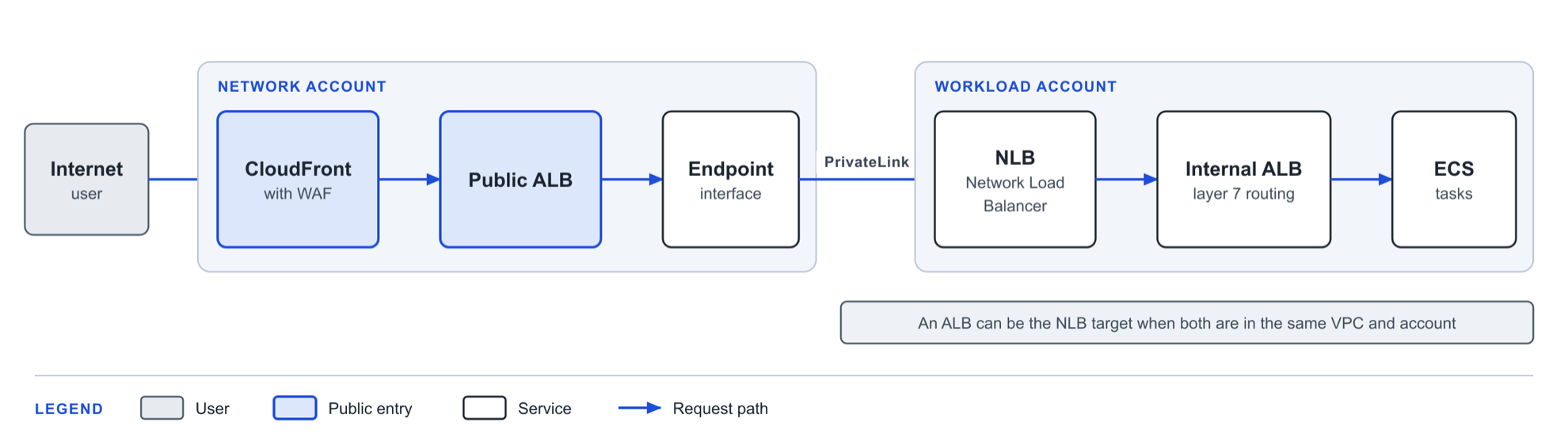
- The user reaches CloudFront, with WAF in front of the application.
- CloudFront forwards to the public ALB in the Network account.
- AWS PrivateLink carries the request into the Workload account. No route between the two accounts is needed.
- A Network Load Balancer receives it, because a PrivateLink endpoint service has to sit behind one.
- The Network Load Balancer forwards to an internal ALB in the same VPC. AWS allows an ALB as the target of a Network Load Balancer when both are in the same VPC and account.
- The ALB routes to the ECS tasks.
The workload keeps its ALB's layer 7 routing, and the Network account never needs to know where the tasks are.
Fits when: several workloads will land over time, and one team owns the firewall and the public front door.
Example B: three accounts, private spokes with central egress
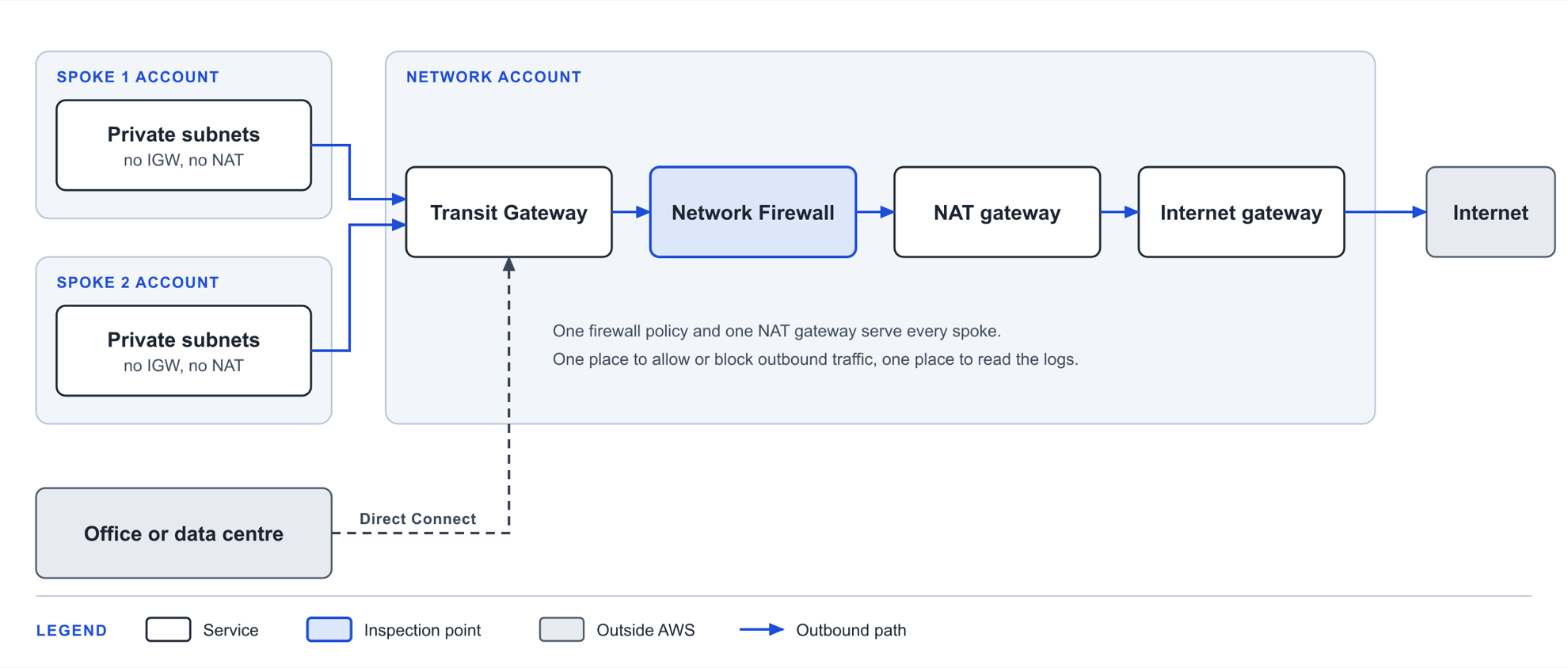
| Account | What lives there |
|---|---|
| Network | Transit Gateway, Direct Connect to the office or data centre, Network Firewall, NAT gateway, Internet Gateway |
| Spoke 1 | Workloads in private subnets only. No Internet Gateway, no NAT gateway |
| Spoke 2 | The same, for the second environment or team |
Outbound traffic from a spoke follows one path:
- The spoke's default route points at the Transit Gateway.
- The Transit Gateway sends it to the Network account's VPC.
- Network Firewall inspects it.
- The NAT gateway translates it and the Internet Gateway sends it out.
One NAT gateway and one firewall policy serve every spoke, so there is a single place to allow or block outbound destinations and a single place to read the logs.
For traffic coming in from the internet, two options exist:
| Option | How it works | Good when |
|---|---|---|
| Central ALB to IP targets | A public ALB in the Network account sends traffic over the Transit Gateway to the private IP addresses of the spoke's workloads | Few, stable targets, and you want one central layer 7 edge |
| PrivateLink | Each spoke keeps an internal ALB behind a Network Load Balancer published as an endpoint service. The Network account's public edge connects through an interface endpoint | Many services. The path does not depend on routes between the accounts, and each spoke stays isolated |
WAF protects the inbound path at the edge. Network Firewall covers outbound and traffic between VPCs.
Fits when: workloads are reached mainly from your own network over a private line, and outbound traffic has to be controlled in one place.
The two network layouts in section 1.4 sit inside either example: Option A (one VPC) or Option B (a VPC per environment, joined by the Transit Gateway) can be used in any of the workload accounts above.